
What is the Daily Tracker?
The BetterSquash Daily Tracker is a simple personal tool for recording your squash activity day by day. Each cell in the grid represents one day. Click it to record whether you trained hard, trained, or did nothing. Click again to cycle through the states. A fourth click clears the cell.
The tracker covers five years from May 2026. It is designed to give you a long-term picture of your commitment to the game, not just what you think you did last week, but what you have consistently done over months and years.
It took its inspiration from the tagline of my YouTube channel and website: DO SOMETHING EVERY SINGLE DAY TO IMPROVE YOUR SQUASH!
The click philosophy
When I used paper to record this sort of thing, I had an option for "ill". I included that becasue I felt it wasn't fair to include illness in the "nothing" input. Fot this online version, I have removed it.
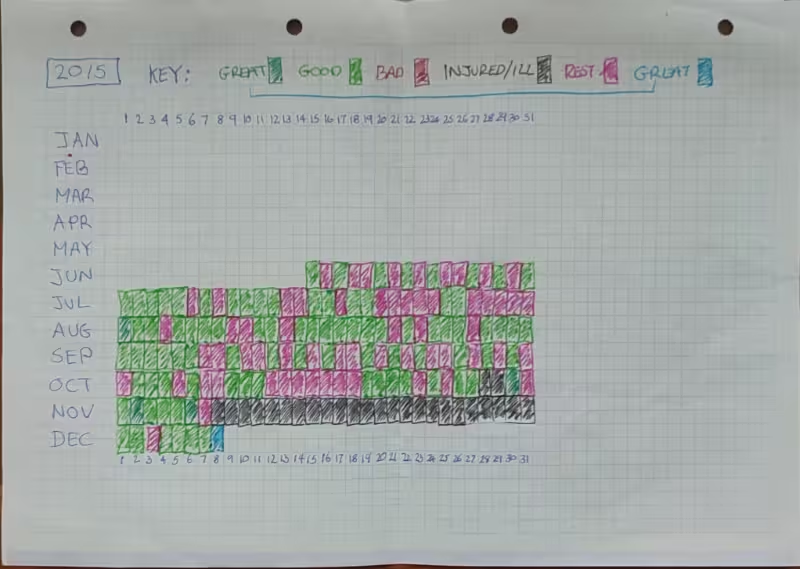
Not everybody will agree with the three choices the tracker has; Trained Hard, Trained, Nothing, but I wanted to keep it simple. I also recognised that it could even be binary; T rained or Nothing, but I felt that there were days when we feel that we took two steps forward not one. I'd love to hear you thoughts on this.
What I use it for
I'll be honest, I don't use it for my squash training. I use it to record whether I have done something that gets me closer to my goal of creating practical and useful coaching material for club players.
I built it for me
I built this for me. It's one of a number of Claude-built mamangement tools I have created for my squash. I am releasing it becasue this one might be useful for other people.
How your data is stored
Your data is stored exclusively in your browser using localStorage, which is a built-in browser feature that saves small amounts of data on your device. Nothing is sent to BetterSquash or any server. Nobody else can see your data. It is completely private and entirely yours.
Your tracker data is saved under two keys in localStorage:
bs_tracker_lastuser— your chosen usernamebs_tracker_state_{username}— your full grid state, stored as JSON
Because the data lives in your browser and not on a server, it is not synced between devices or browsers. Your data on your laptop is separate from your data on your phone. Use the Export function regularly to keep a backup you can restore from.
When will data be lost?
The table below covers the most common scenarios:
| Scenario | Data lost? |
|---|---|
| I fix a spelling mistake and update the file on the server | No — safe |
| I add new features or redesign the page | No — safe |
| You reload or refresh the page | No — safe |
| Your computer or phone restarts | No — safe |
| You close and reopen your browser | No — safe |
| You open the tracker in a different browser (e.g. Chrome vs Safari) | Lost — different browser, different localStorage |
| You open the tracker on a different device | Lost — different device, different localStorage |
| You clear your browser history or site data | Lost — localStorage is wiped |
| You use your browser's "Clear cookies and site data" function | Lost — localStorage is wiped |
| You use private / incognito mode | Lost when the private window closes |
| You change your username | Old data remains under the old username, it's not deleted, but not visible until you switch back |
| You uninstall and reinstall your browser | Likely lost, but it depends on whether the browser backed up profile data |
Can multiple people use the tracker on the same device?
Yes. Each username has its own independent dataset, so two people can use the tracker on the same device without their data mixing. However, the page always loads as whoever used it last — there is no login or user-switching screen. Each person needs to click the username in the header to switch to their own before recording anything.
If two people share a device regularly, the simplest arrangement is for each person to use a different browser. One person uses Chrome, the other uses Firefox or Safari. Each browser has its own completely separate localStorage, so there is no risk of accidentally recording on the wrong person's data, and no need to switch usernames each time.
A note on private or incognito mode: this is not a good choice for the tracker. Private mode does use localStorage while the window is open, so the tracker will appear to work normally — but all data is deleted the moment you close the private window. If you have been tracking in private mode without exporting, that data is gone. Always use a normal browser window for the tracker.
Does updating the page on the server affect my data?
No. The tracker page is just the interface — a set of instructions your browser follows to draw the grid and handle clicks. Your data lives separately in localStorage on your device. Updating the file on the server is like repainting a shelf: the items stored on it are untouched.
This means Phillip can fix bugs, update the design, and add features without any risk to your saved data. The only thing that would cause a problem is if a future update changed the localStorage key names — which there is no reason to do, and which would be flagged clearly if it ever became necessary.
Export and import
The Export button saves your current data as a JSON file to your device. The filename includes your username and the export date, for example bettersquash-tracker-jacksmith-2026-05-08.json.
The Import button lets you load a previously exported file back into the tracker. This is useful if you have cleared your browser data, switched devices, or want to move your history from one browser to another. Importing replaces your current data with the contents of the file.
JSON files are plain text and can be opened in any text editor if you ever want to inspect or manually edit your data.
Username
Your username is chosen when you first open the tracker and is stored locally on your device. It is used purely as a key to find your data in localStorage — it is not sent anywhere, not verified, and not visible to anyone else.
You can change your username by clicking on it in the page header. Your old data remains saved under the old username and is not deleted — it simply becomes inactive until you switch back. If you change your username and then want your old data back, export your data first, change back to the old username, and import the file.
Privacy
The tracker collects no personal information. There are no accounts, no sign-ins, no cookies, no analytics, and no server-side storage. Your squash activity data never leaves your device unless you export it yourself.
If you choose to run the tracker as a local file on your own device rather than via bettersquash.com, be aware that your locally stored data will not carry across to the online version automatically. You will need to export your data every time you finish a session and import it again when you next use the other version. For most people, picking one version and sticking to it is the simpler approach.
Version history
The tracker version number is shown on the Daily Tracker line in the header of the tracker page. The about page has its own version number in the footer. The two may differ — the about page is updated independently when documentation changes, and a new tracker version does not automatically mean the about page has changed, or vice versa.
If you have downloaded a local copy of the tracker, compare your version number with the one shown at below to check whether a newer version is available.
Minor updates — bug fixes, wording changes, small visual tweaks — will not always result in a version number change. A new version number means something meaningful has changed in how the tracker works or what it can do.
- v1.0 — Initial release. Five-year grid, three training states, username, export and import, multiple users, responsive layout.
Why isn't this an app?
The original idea for a daily squash tracker was conceived during COVID, and I considered using the time at home to make it into an app, but like many things it just got shelved. Origianlly, I planned to allow users to select what type of training they had done; stretching, mobility, cardio, strength, ghsoting, solo, pairs' matches, visulisation, other mental work and other sports. There would be tables of users, stats, ranking, badges etc, with all the "gamified features" we see so often in these sorts of apps. The reality is that as much as an app would be cool, this might be good enough. And "good enough" is better than nothing.
The concept was never fully developed, and by the time courts reopened the urgency had passed. A simple browser-based tool turned out to cover everything the app would have done, without the overhead of app store submissions, platform maintenance, or update cycles.
There is a case for taking this further, like adding streaks, personal bests, weekly summaries, and other gamification elements that would encourage consistency. But that development time is better spent elsewhere. The BetterPractice app is the primary app priority for me, and of course more videos and practice plans.
The tracker will stay as a lightweight, no-fuss browser tool. Simple is fine.
The future of the tracker
The tracker is currently a standalone personal tool with no server connection. There are no firm plans to change that, but one possibility being considered is an opt-in anonymous dashboard, which would be a separate page that would display aggregate statistics across all users, such as the most active days of the week or average training frequency. If this is ever built, participation would be entirely optional and no personal data or usernames would ever be involved.
Nothing about the above is guaranteed. The tracker may stay exactly as it is indefinitely, and that is not a problem, since it works well as a private local tool.
Using the tracker offline
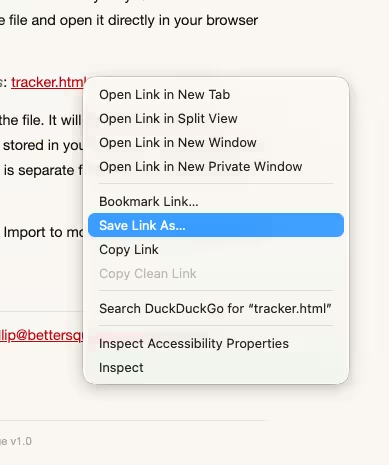
The tracker is a single self-contained HTML file. If you would prefer to run it entirely on your own device without any connection to bettersquash.com, you can download the file and open it directly in your browser from your hard drive.
To download it, right-click the following link and choose Save link as: index.html.
Save it anywhere on your computer and open it by double-clicking the file. It will open in your default browser and work identically to the online version. Your data will be stored in your browser's localStorage as normal — but note that the data stored when running the file locally is separate from the data stored when using the online version, so the two will not share history.
If you switch between the online and local versions, use Export and Import to move your data between them.
You may be able to do this on your mobile device too, but I haven't tried.
The code
I built the tracker and this page, in a couple of days with Claude. From the first prompt to simple functionailty took 10 minutes. The rest of the time was getting the layout and design right.
Questions, Bugs or Feedback
If you have questions about the tracker, you can reach Phillip at [email protected] or via the BetterSquash Discord.